The Apex problem nobody talks about
I was on a call with a CRO last week. I asked how they calculate Up-for-Renewal Amount. The answer: a developer wrote Apex 18 months ago. It pulls renewal opportunity line items, matches them to original contracts by product, extracts the base price, annualises it, and writes it back to a custom field.
Nobody on the revenue team knows exactly how it works. Nobody wants to touch it. The number feeding their board deck comes from a formula they can't explain, maintained by a developer who'd rather be doing something else.
This isn't unusual. It's the norm. Every Salesforce org I've worked with has critical calculated fields buried in Apex classes or Process Builder flows that nobody fully understands. UFR. NRR. Net New ACV. Weighted pipeline. Growth drivers. The logic isn't complicated. But the implementation is brittle, untestable without a developer, and impossible to change without a deployment pipeline.
Flows don't fix this either
Salesforce Flows were supposed to be the answer. Visual. No code. Accessible to admins. In practice, they hit limits fast. Governor limits on complex queries. Bulkification headaches when processing thousands of records. No versioning. No rollback. One bad activation and you're debugging at midnight while case routing is down for 200 agents.
And the visual canvas? It works for simple automations. But try building a multi-object calculation that matches renewal line items to original contract products, extracts the delta, annualises it, and writes it back. Your Flow canvas will look like a wiring diagram from a 1970s telephone exchange.
The real issue is that calculated fields sit in a gap between what admins can configure and what developers should be building. Too complex for formula fields. Too operational for Apex. Too fragile for Flows. So they end up wherever someone had bandwidth, and they stay there forever.
7 blocks instead of 400 lines of Apex
We built the Calculated Fields Engine to close that gap. It's a visual block builder where you connect purpose-built blocks on a canvas. Each block does one thing well. Query blocks pull Salesforce data. Match blocks join record sets by any key. Formula blocks do the maths. Write-back blocks push results to any custom field.
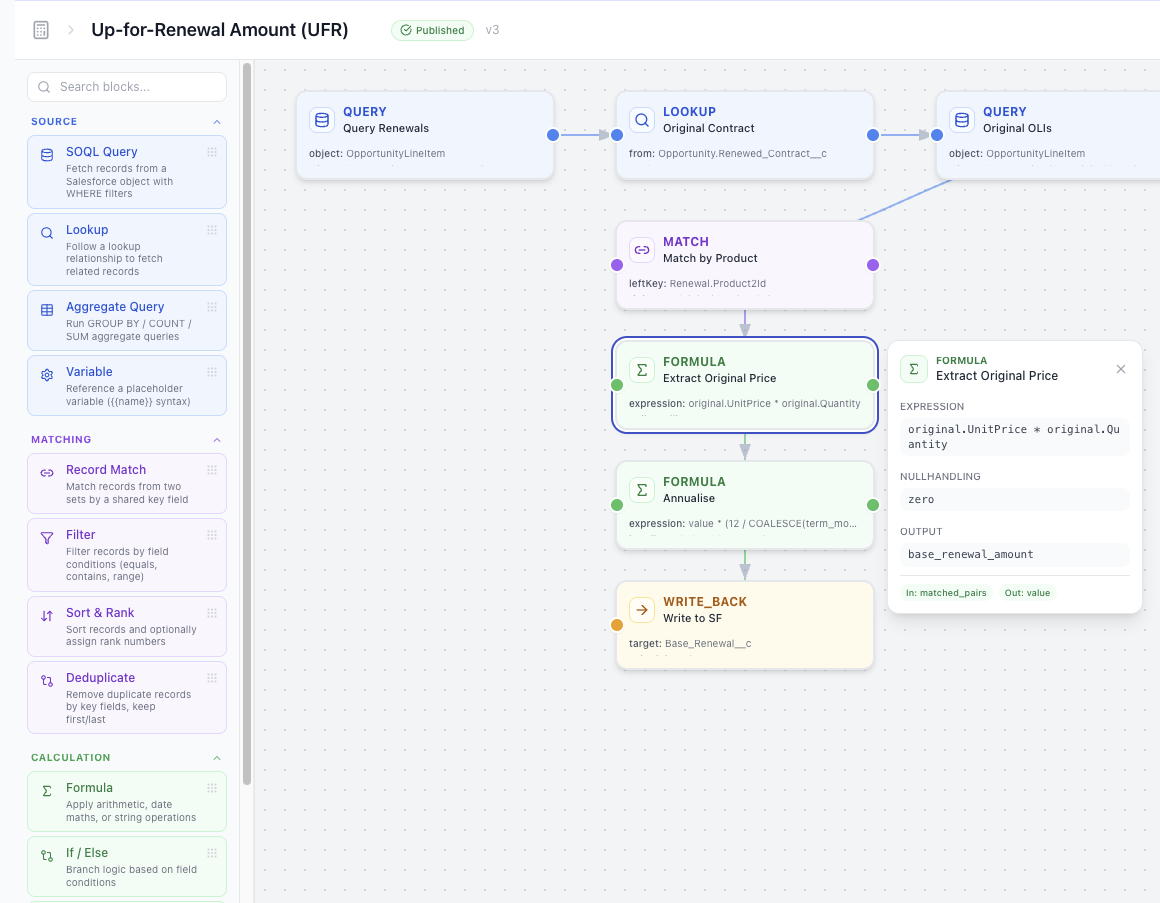
That CRO's UFR calculation? Seven blocks. Query the renewal opportunity line items. Look up the original contract via the renewal relationship. Query the original OLIs. Match them by Product2Id. Extract the original unit price. Annualise it for term length. Write back to a custom field on the opportunity.
Each block shows exactly what it does. Click it and you see the configuration: which object, which fields, which filter, which formula. No hunting through Apex classes. No deciphering Flow nodes. The logic is visible to anyone who can read a flowchart.
Preview before you publish
The right panel shows a live preview with sample data from your org. Before you publish anything, you can see exactly what the output will look like. Renewal amount, original amount, calculated UFR. Four records, zero errors.
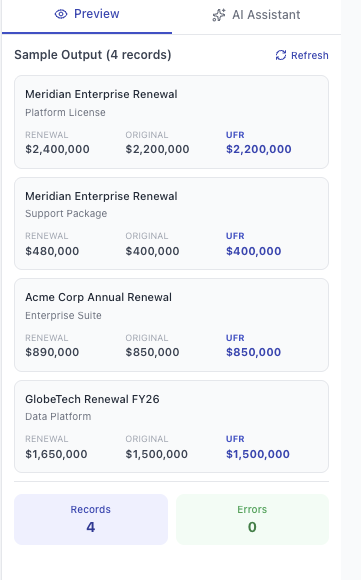
This is the part that changes the conversation with your revenue team. Instead of "trust us, the Apex does the right thing," you can show them the actual calculation on real data. If the number looks wrong, you tweak a block and preview again. No deployment. No test classes. No waiting.
The AI builds it for you
Not everyone wants to drag blocks onto a canvas. Sometimes you just want to describe what you need and have someone build it.
The AI assistant sits in the right panel. Tell it what you want to calculate in plain English. "I need the up-for-renewal amount for each opportunity, calculated by matching renewal line items to original contract line items by product, then comparing the current price to the original price."
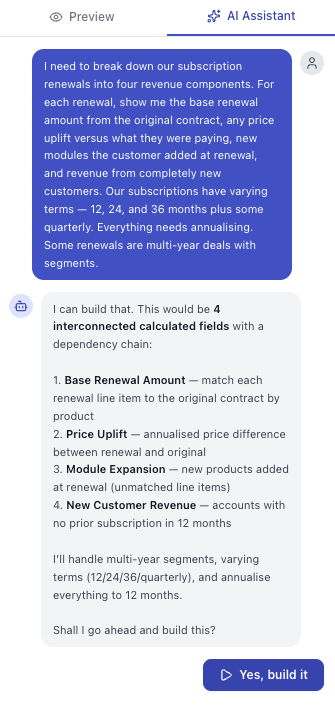
The AI proposes a design. Explains which blocks it will use and why. Asks for confirmation. Then builds the entire block chain on the canvas, wires the connections, and sets the configuration. You review, tweak if needed, and publish.
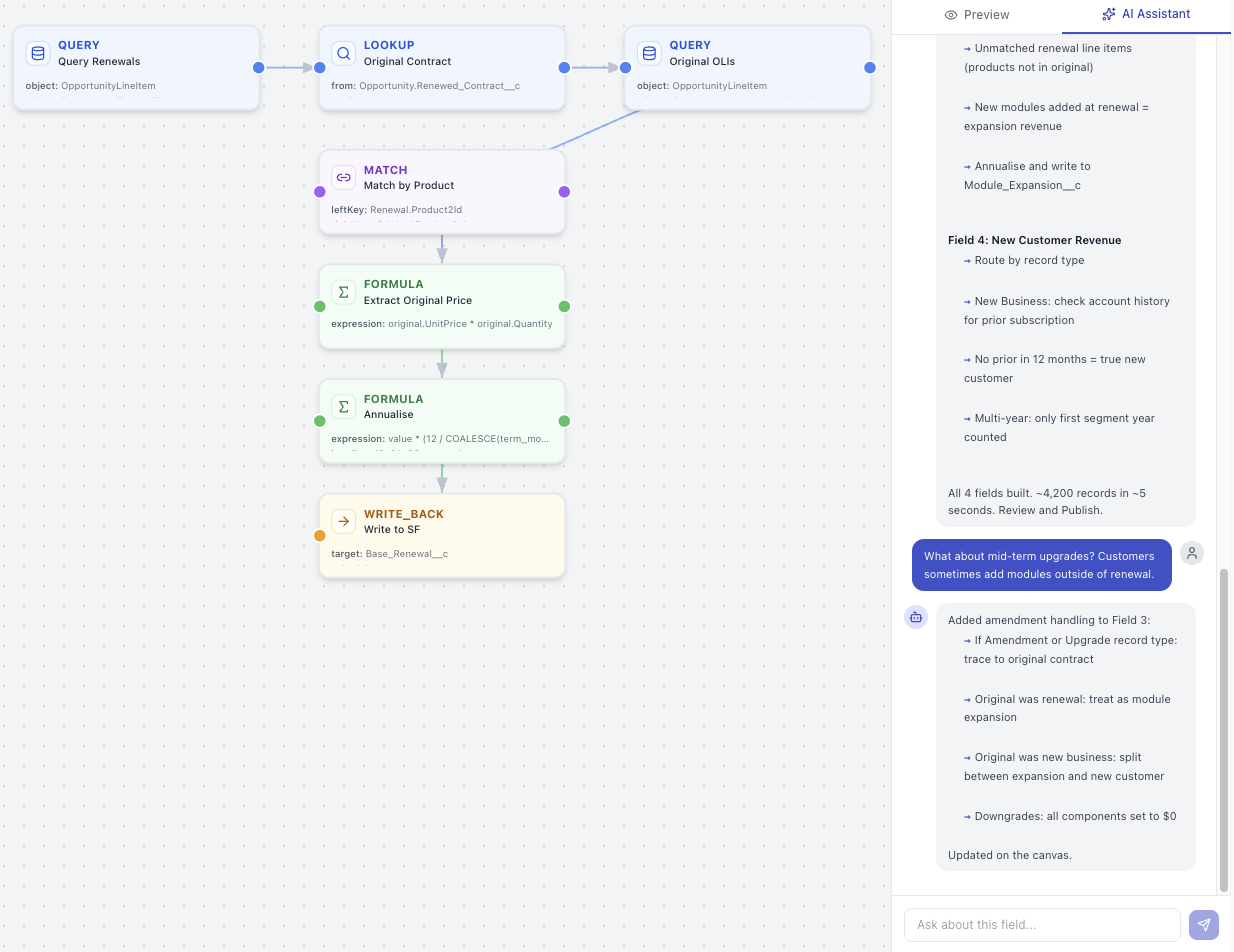
Already have this logic in Apex? The AI can convert it. Paste your Apex class, and it translates the logic into blocks. Same for Flows. You don't have to rebuild from scratch. You migrate what already works into something your whole team can see and maintain.
Templates for the calculations everyone needs
Not every calculated field is unique. UFR, ACV, NRR, weighted pipeline, days since last activity. These are the same calculations at every company, with minor variations in field names and business rules.
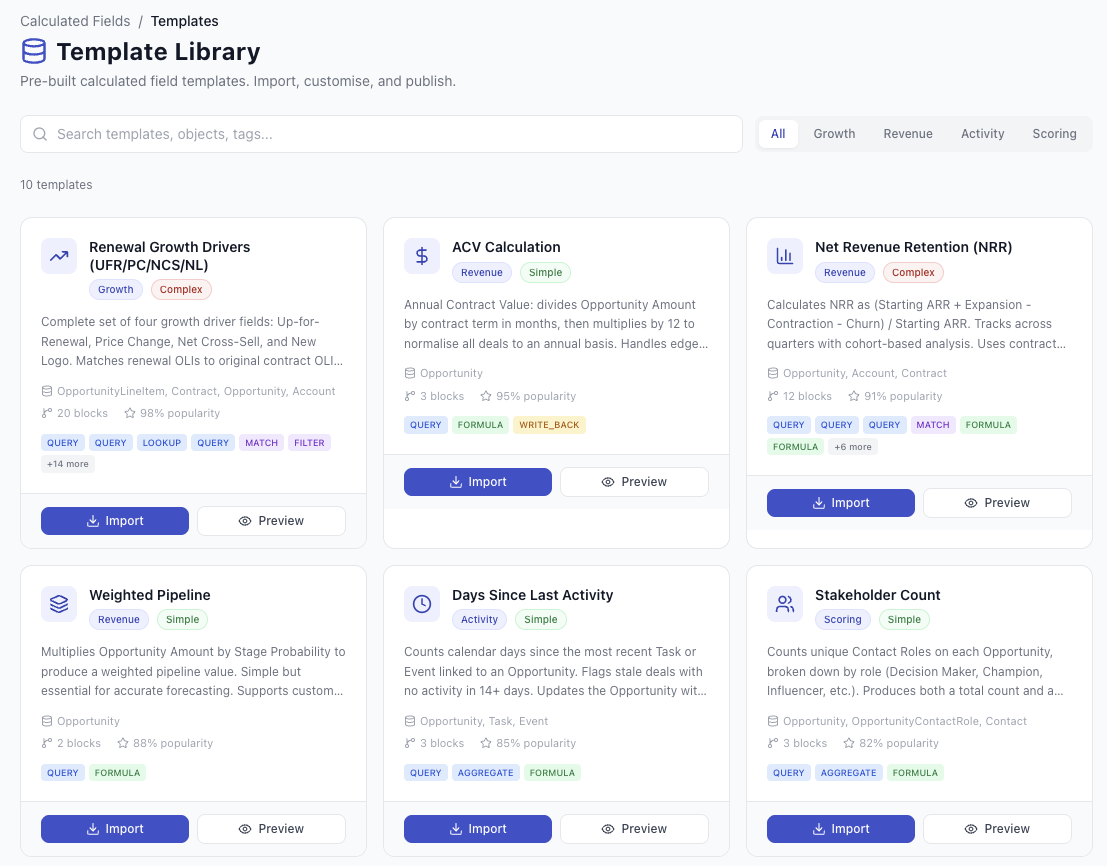
The template library has ten pre-built fields ready to import. The Renewal Growth Drivers template is 20 blocks and covers UFR, price change, new customers, and net loss. ACV normalisation is 3 blocks. NRR by cohort is 12. Import one, customise the field names for your org, and publish. What used to take a sprint takes an afternoon.
Variables keep things consistent
When multiple calculated fields reference the same threshold or target, you don't want to hardcode it in every formula block. Variables let you define a value once and reference it everywhere.
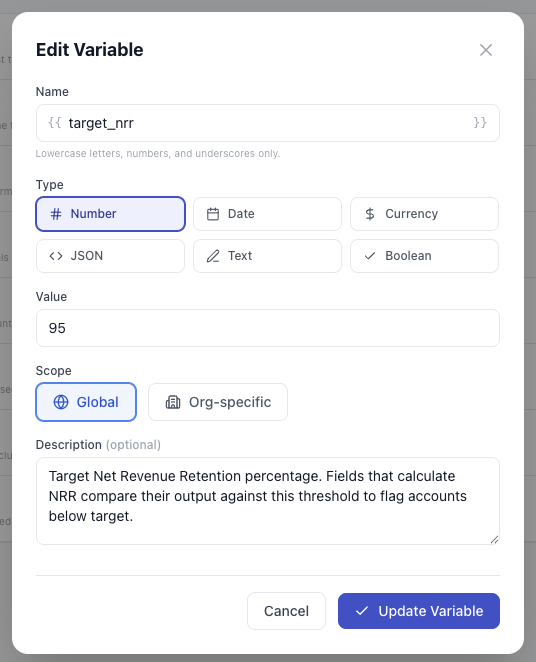
Your target NRR is 95%? Define it as a global variable. Every field that calculates NRR compares against that threshold. When the target changes next quarter, update one variable. Not six formula blocks across three calculated fields.
Variables can be global or org-specific. A global variable applies to every connected org. An org-specific variable lets you set different thresholds per business unit or region. Supports numbers, dates, currency, text, JSON, and booleans.
Scheduled or real-time. Your choice.
Some calculated fields need to update every hour. Others can run once a day. Some should fire immediately when a record changes.
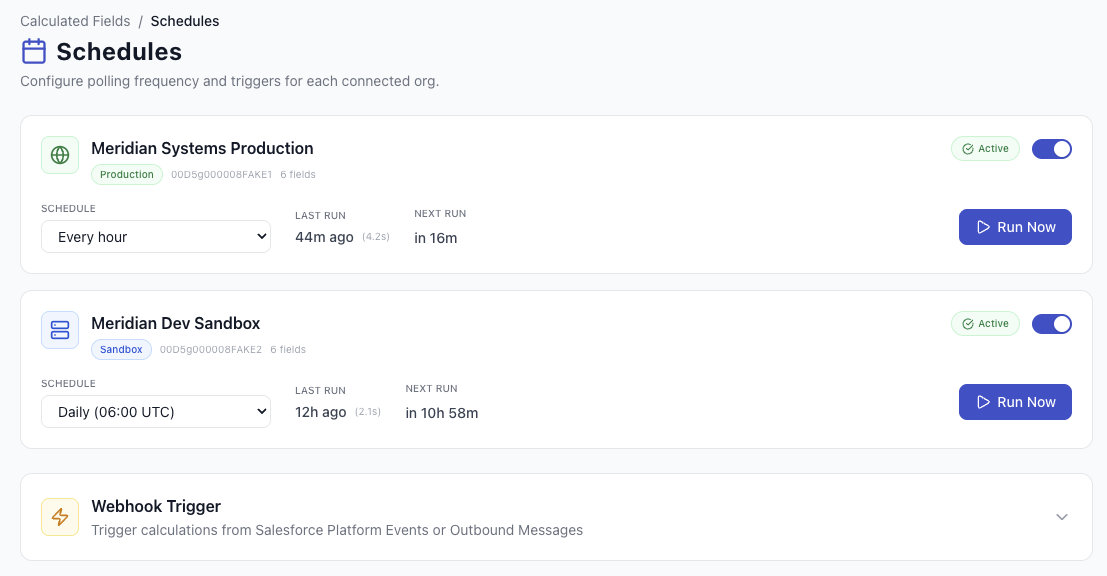
The schedules page lets you configure polling frequency per org. Hourly for production fields that feed dashboards. Daily for sandbox testing. Or skip polling entirely and use webhook triggers. Connect a Salesforce Platform Event or Outbound Message, and the calculation fires in real time when a record changes.
This is flexibility that Apex can't match without building a custom scheduling framework. And Flows have no concept of scheduled batch recalculation at all.
The point isn't "no code." The point is visibility.
The real problem with Apex-based calculated fields isn't that they require code. It's that the logic is invisible to the people who depend on it. Your CRO can't open a class file and verify the UFR calculation is correct. Your VP Sales can't check whether the weighted pipeline formula accounts for stage probability. Your RevOps lead can't adjust the NRR threshold without filing a Jira ticket.
A visual builder makes the logic visible. Anyone can click a block and see what it does. Anyone can trace the connections from source data to final output. Anyone can preview the results against real data before anything changes in production.
That's not a developer tool pretending to be admin-friendly. It's a different way of thinking about calculated fields entirely. The logic belongs to the revenue team, not the engineering backlog.
Try the full Calculated Fields Engine in the interactive demo. Build a field, use the AI assistant, preview with sample data. Every feature is live at pocavi.ai/demo.