The problem: SARs take forever in Salesforce
Someone emails your DPO asking for a copy of all their personal data. Under GDPR, you have 30 days to respond. Sounds generous until you realise the data is scattered across Contacts, Leads, Cases, Opportunities, custom objects, attachments, and activity history.
Most Salesforce teams handle this manually. Export reports, search each object, cross-reference email addresses, check for duplicates, compile everything into a spreadsheet. If someone then asks you to delete their data, you do the whole thing again in reverse, making sure you hit every record and leave an audit trail for the regulator.
For a typical org with 30+ objects containing person data, a single SAR takes 10 to 20 hours of admin time. Multiply that by the number of requests you get each quarter.
Universal person search: one query, every object
Pocavi scans every object in your org for person data. Enter an email address, name, or phone number and get back every record that matches, across standard and custom objects, in seconds.
- Search by email, name, phone, or any combination
- Scans all standard objects (Contact, Lead, Case, Account, User, etc.) and every custom object
- Multi-org search: scan one, several, or all connected orgs at once
- Results grouped by object with record count and field matches highlighted
No more running 15 different reports. No more wondering if you missed an object. The search is exhaustive by default.
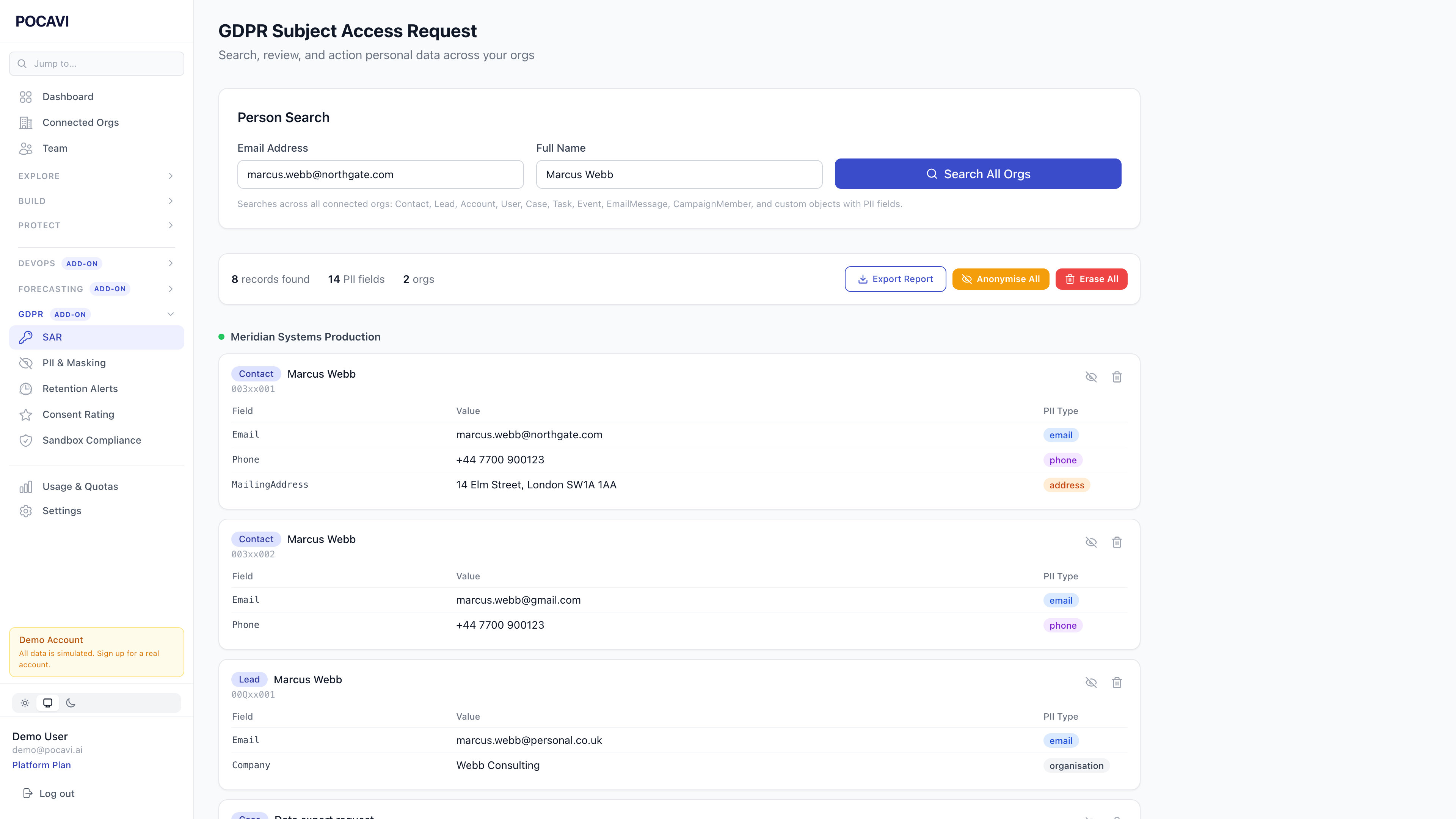
Choose per record: delete or anonymise
Once you have the results, you choose what to do with each record. Delete it entirely, or anonymise it so the record structure stays intact but the personal data is replaced with consistent hashed values.
- Per-record control: delete some, anonymise others
- User records are handled differently: deactivated and obscured (Salesforce does not allow User deletion)
- Attachments and files are flagged for manual review
- Consistent hashing means the same input always produces the same anonymised output, preserving referential integrity
Snapshot and audit trail
Before any action is taken, Pocavi snapshots the original values. If a regulator asks what data was held and what was done with it, you have the evidence. Snapshots are restorable for 30 days in case of mistakes.
Every action is logged to an immutable audit trail: who searched, what was found, what action was taken, and when. This is the evidence your DPO needs when responding to regulators.
Beyond SARs: processing register, DPIA templates, breach workflow
The SAR tool is the headline feature, but Pocavi also includes a processing register to document your lawful basis for each data category, DPIA templates for new processing activities, and a breach notification workflow with regulator timelines and affected person tracking.
A SAR that used to take 10-20 hours of manual work now takes under 5 minutes. Search, review, action, done. With a full audit trail for the regulator.
How it works in practice
Your DPO receives a SAR via email. They log into Pocavi, type the person's email address, and hit search. Within seconds they see every record across all connected orgs. They review the results, tick the records to anonymise or delete, and confirm. Pocavi processes the request, generates the audit log, and the DPO replies to the requester with a summary. Total time: under 5 minutes.
Compare that to the old way: creating a spreadsheet tracker, running reports across every object, manually deleting records one by one, documenting each action, and hoping you did not miss anything. The old way is not just slow. It is a compliance risk.