Run quick or deep scans across security, automation, API limits, metadata, data model, and code quality.
Pocavi Admin
Understand the estate. Diagnose the risk. Change it safely.
The operational workspace for Salesforce admins who need to know what is in the org, what changed, and what needs attention before it becomes a production issue.
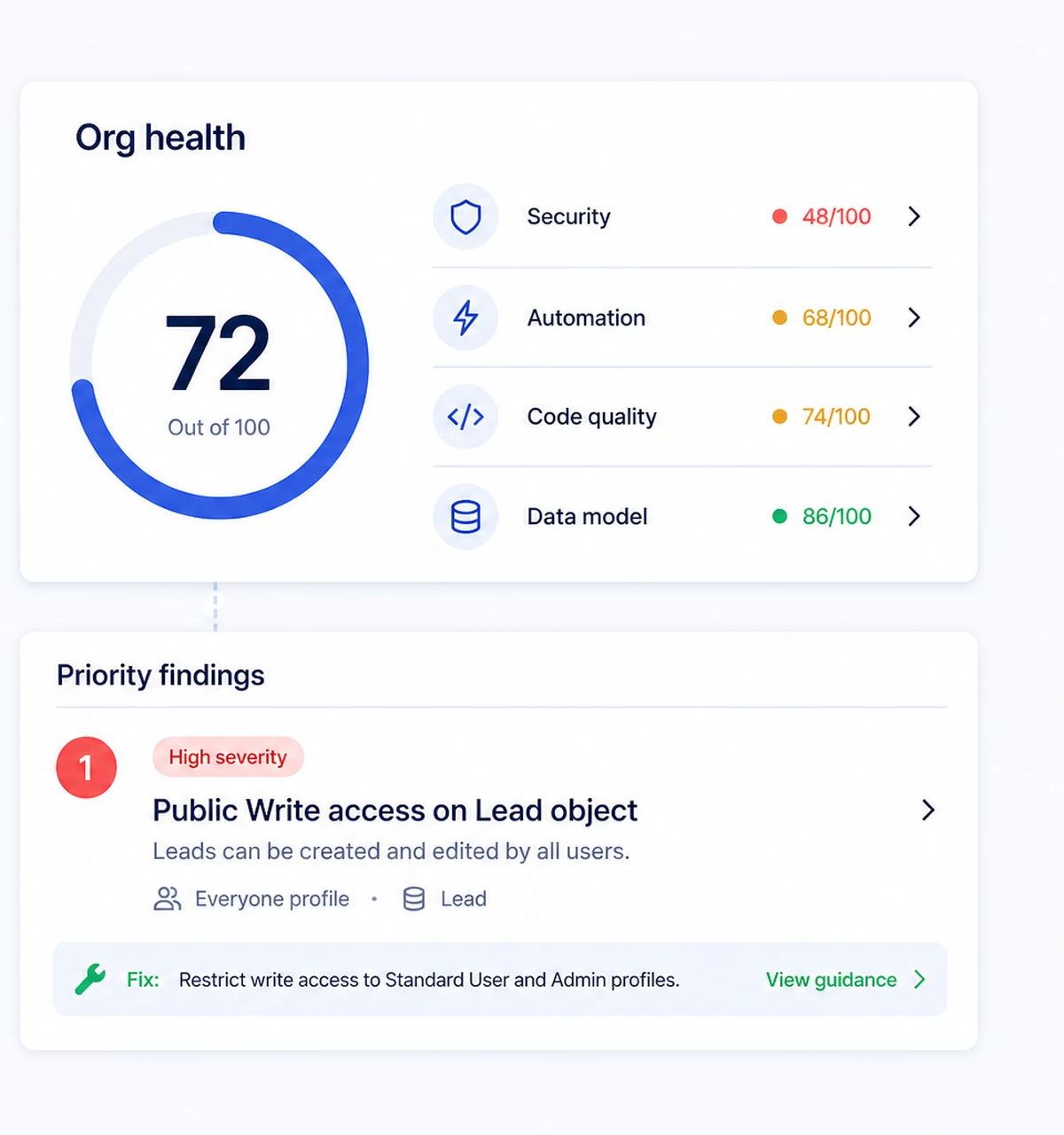
23Health check modules
24Admin capabilities
1-clickMetadata rollback
Read-onlyBackups by default
Capabilities
Understand, diagnose, change, protect.
The Admin product turns routine Salesforce maintenance into a controlled operating rhythm.
- Org Health and MonitoringRuns quick and deep health scans across security, automation, code quality, data model, API limits, metadata, and more.
- SOQL Query ToolLets teams write SOQL with autocomplete or ask questions in plain English and generate the query.
- Data ManagementBrings field impact, smart rename, data dictionary, permissions matrix, picklist management, and CSV loading together.
- User Impact AnalyserFinds records, automation, approvals, queues, and references connected to a user before they leave or change role.
- Salesforce Trust StatusShows live Salesforce instance incidents, maintenance, and release-status context for production orgs.
- Data DictionaryDocuments objects, fields, relationships, picklists, help text, and record types in one exportable view.
- Permissions MatrixBrings profiles, permission sets, CRUD, field access, and user assignments into a single inspection grid.
- Error Monitoring and LogsGroups recurring Flow and Apex errors, tracks trends, diagnoses components, and correlates failures with deployments.
- Salesforce Release ReadinessCross-references Salesforce release changes with the metadata actually used in your org.
- AI Best-Practice ReviewReviews metadata against Salesforce best practices with scored findings, history, and exportable output.
Metadata Backup and Recovery Creates metadata snapshots, visual diff, scheduled backup, and point-in-time rollback.
Field Impact Analysis Finds a field's dependencies across code, flows, rules, layouts, reports, templates, and security before change.
Data Loader and Field Mapping Loads, updates, upserts, or deletes CSV data with mapping, job history, and revert context.
Field Creator Bulk-creates custom fields and objects, with validation, AI suggestions, and assignment to access and layouts.
Picklist Manager Finds picklist values and references, then supports a safe rename with history.
Roll-up Helper Builds and manages parent-child roll-ups with generated Apex, testing, and deployment support.
Automation Map Maps the triggers, flows, and automations on an object, including execution order and recursion risk.
Lookup Filter Manager Lists lookup filters and their criteria, with controls for active state and user-facing errors.
Calculated Field Builder Creates computed field values with a visual builder, dry-run preview, AI assistance, and publishing controls.
Bypass Framework Suggester Audits validation rules, flows, and triggers to recommend a consistent bypass framework and deployment plan.
Calculated Field Templates Provides ready-made calculated-field starting points with block flow and source-object context.
Calculated Field Variables and Audit Manages reusable org-scoped variables, references, schedules, webhooks, and execution history.
Sandbox Seeding and Management Seeds realistic Salesforce data while preserving relationships and helping teams manage sandbox lifecycle.
Sandbox Manager and Comparison Lists, creates, and compares Developer, Developer Pro, Partial, and Full Salesforce sandboxes.
Admin
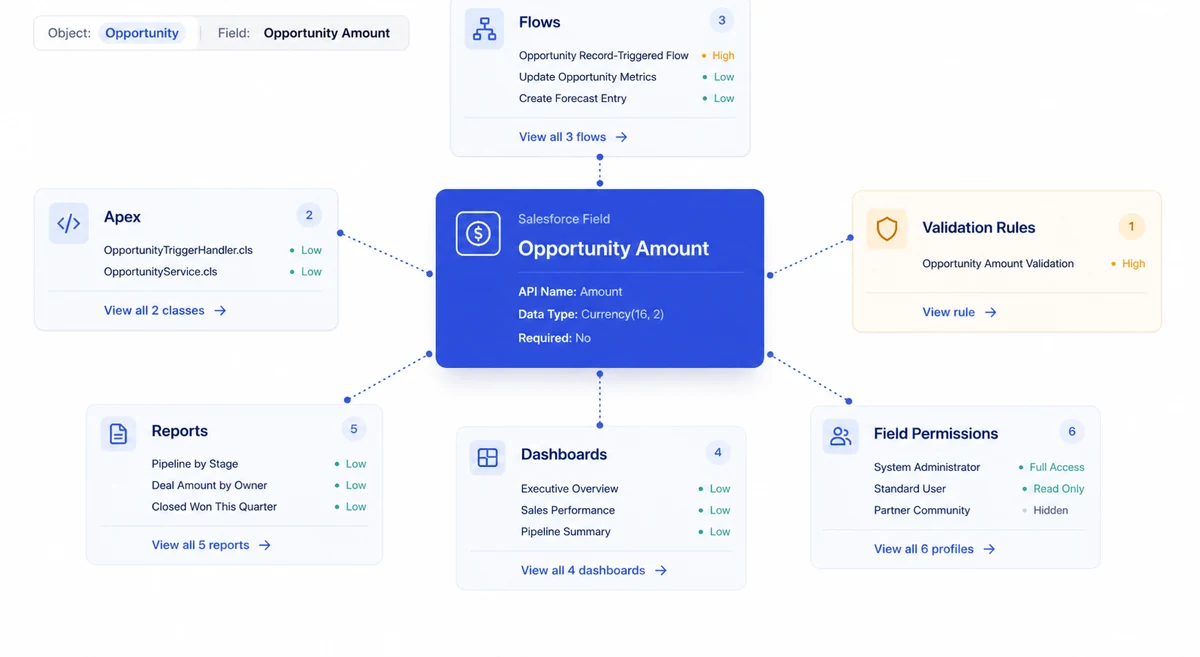
See the blast radius before you change anything
Every place a field is used, across flows, rules, reports, formulas and integrations. Two of these five will break. You know which before you touch it.
Admin
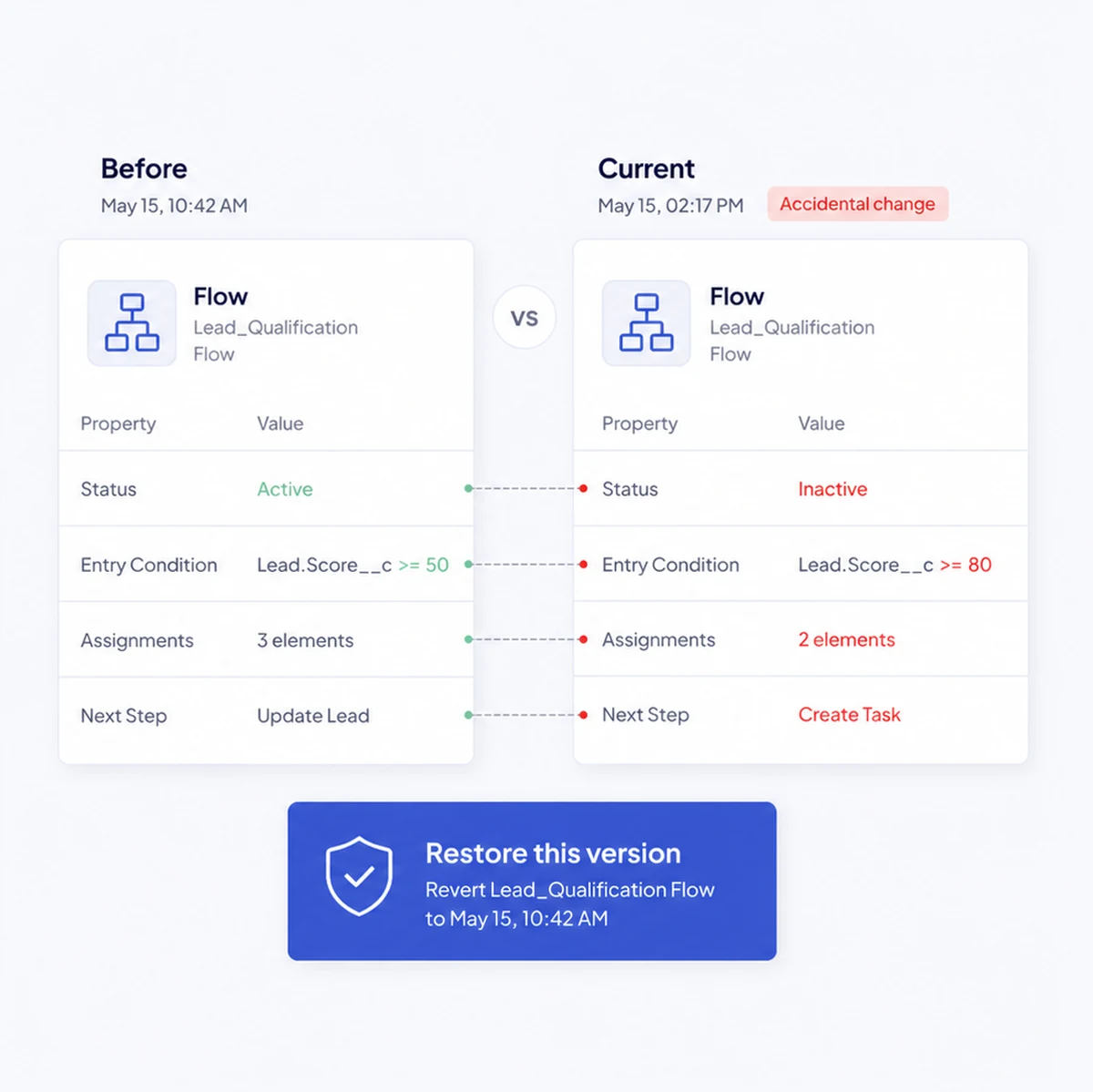
Undo the change nobody meant to make
Versioned metadata snapshots, a diff of exactly what moved, and a one-click revert to the version from before lunch.
Admin
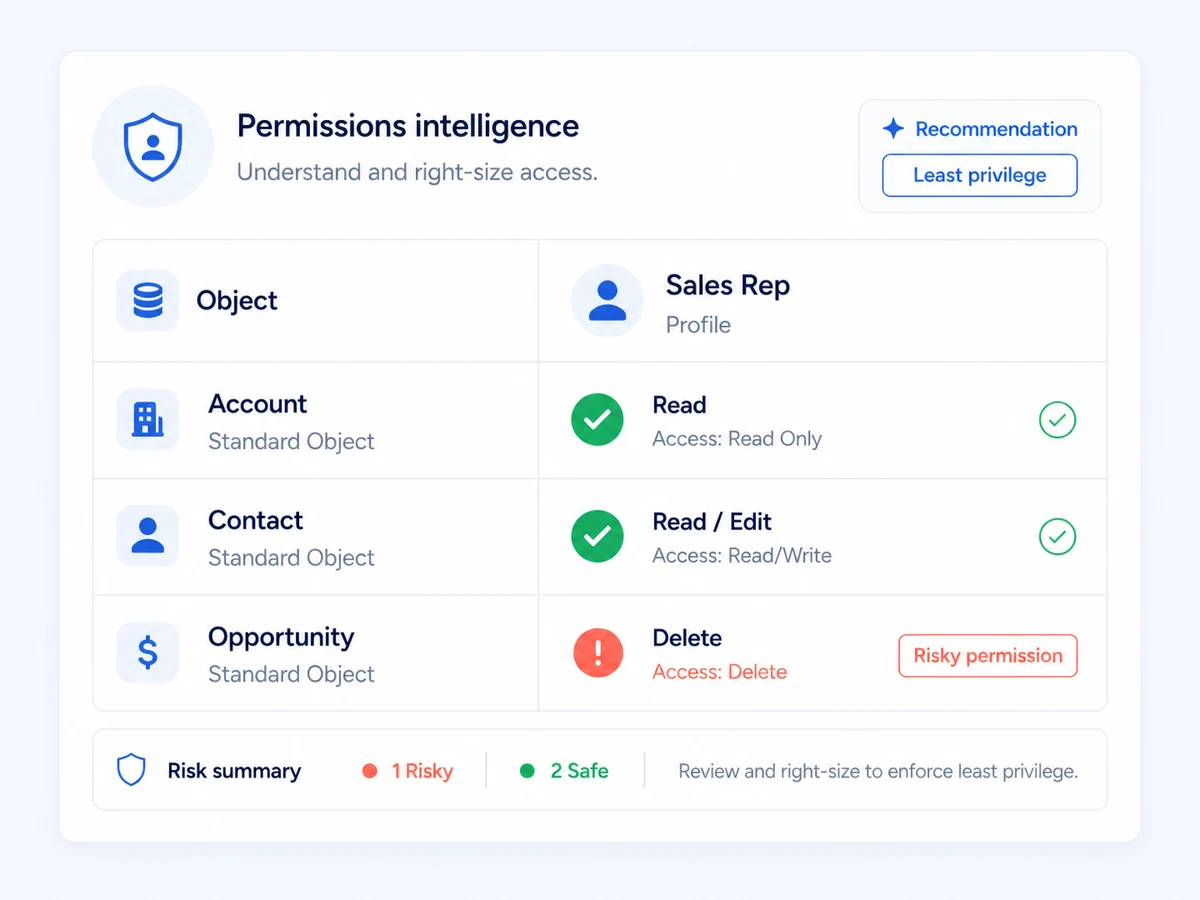
Right-size access without guessing
Profiles and permission sets against the objects they touch, with the permissions nobody intended to grant flagged.
Admin
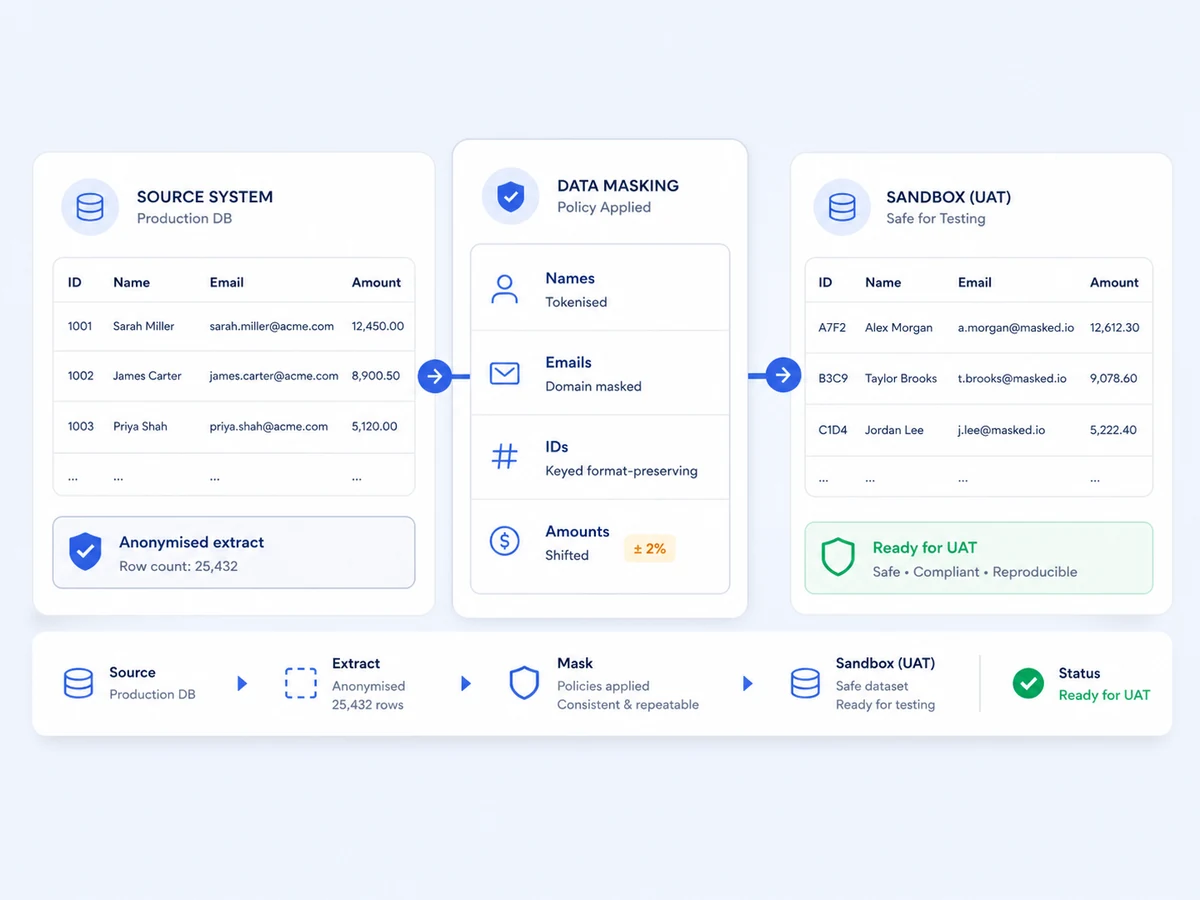
Sandboxes with real shape, not real people
Names tokenised, emails masked, amounts shifted, and referential integrity kept. The data behaves like production without being it.
Admin
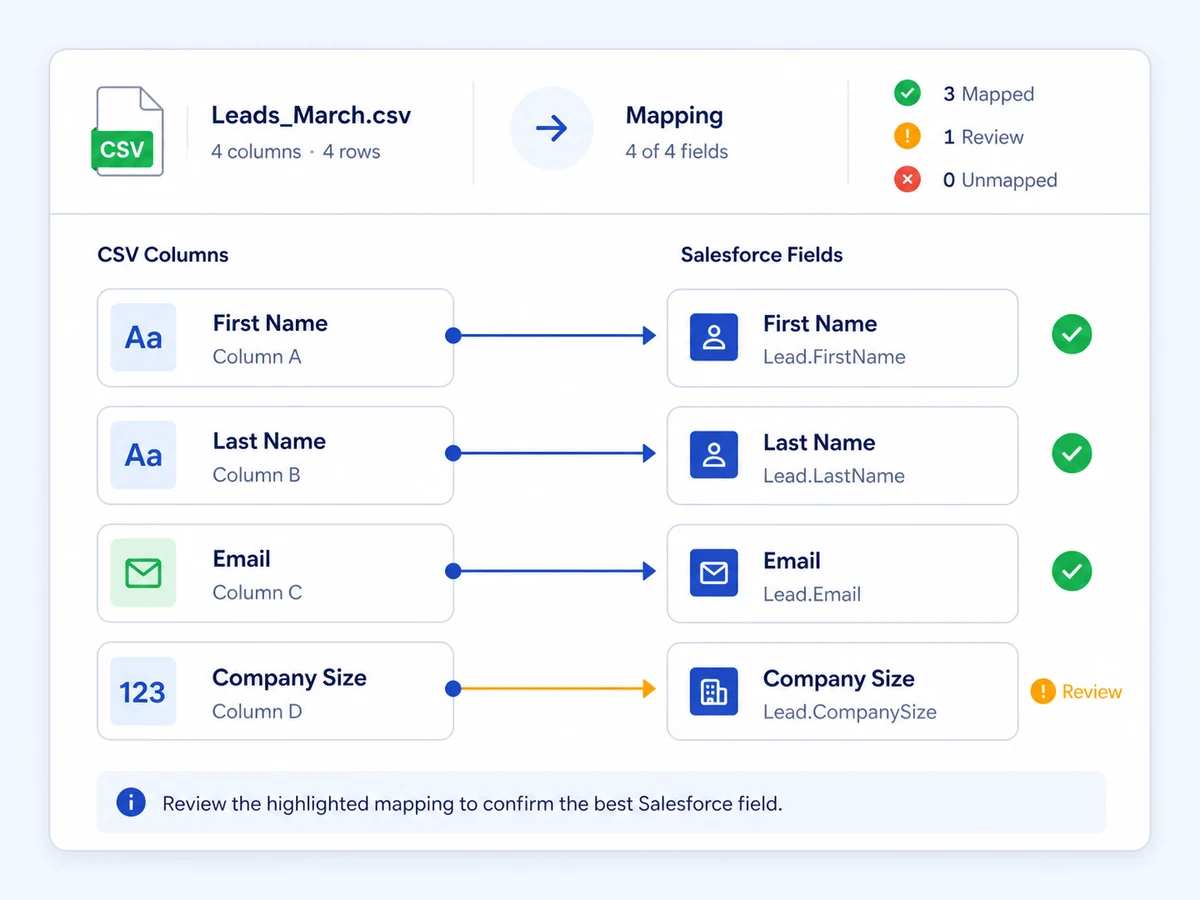
Load data without the mapping guesswork
Pocavi proposes the field mapping and tells you which one it is not sure about, so the review is thirty seconds rather than an afternoon.
The workflow
How the work actually runs
Inspect the finding, compare scans, trace a field impact, and understand what is really affected.
Use deploy tools, smart rename, data management, and sandbox workflows with the right context in hand.
Schedule backups, monitor Salesforce Trust, and keep recovery points ready if a change goes wrong.
Integrations
Fits the tools your team already uses
Pocavi connects to Salesforce through OAuth and reads metadata. No managed package to install.
All integrations- SalesforceOAuth connection to production, sandboxes and developer orgs.
- GitHub and GitLabTrack metadata against the repository it came from.
- Jira and LinearLink a change to the ticket that asked for it.
- WebhooksPush scan results and alerts wherever your team already looks.
Security
Read-only by default, and reversible by design
Admin work touches production. The product is built so that looking is free and changing is deliberate.
Security overview- Scans and backups are read-only. Nothing is written until you ask for it.
- Metadata snapshots are versioned, so any change has a route back.
- Role-based access separates who can look from who can deploy.
- Every scan, deployment and recovery keeps an attributable record.
Questions
Before you book a demo
Does Pocavi need a managed package installed in my org?
No. Pocavi connects through Salesforce OAuth and reads metadata through the API. There is nothing to install and nothing to uninstall.
What does a health scan actually check?
Nineteen check modules across security, automation, code quality, the data model, API limits and metadata. A quick scan takes about thirty seconds; a deep scan takes a few minutes.
Can Pocavi change anything in my org without me asking?
No. Scanning, backup and analysis are read-only. Deployments, data loads and rollbacks each require an explicit action.
How far back does metadata recovery go?
Snapshot retention depends on your plan, from seven days on Starter to a full year on Platform. Every snapshot can be compared and restored individually.
Read next
Go deeper on the job itself
Salesforce org health: find risk before it becomes an incident
A practical guide to health checks, metadata intelligence, field impact, monitoring, safe change, and recovery for Salesforce teams.
Read the Admin guideHow to change a Salesforce field without breaking the estate
A field change is rarely only a field change. Start by tracing the dependencies across automation, code, layouts, reports, security, and integrations. Then make the change with a recovery point already prepared.
Explore AdminPricing
Admin is $799/estate/mo
per Salesforce estate / month. Bundle it with the products next to it and the price comes down.
The rest of the platform